Talk to your band. Directly.
Pebble is a native, offline iPhone app for the Fitbit Air. It speaks the band's own Bluetooth protocol in short authenticated sessions: alarms, vibration alerts, live heart rate and honest training trends. No account, no cloud, and Google Health keeps syncing.
Six layers between your phone and your wrist.
The Air uses Google's open-source Golden Gate stack: a tiny IP network carried over Bluetooth LE, secured with DTLS, speaking CoAP with protobuf payloads. Pebble embeds the same stack in a small C bridge that exposes only a fixed list of routes. Pick a layer.
The band is the client. The phone is the server.
Every Air has two 16-byte pre-shared keys, primary and secondary, each with a 32-bit ID. The band opens with a PSK identity naming the key; Pebble looks it up in the Keychain and answers as the DTLS server.
Your band's keys, read once.
The keys live in Google's cloud. For this project they were recovered with a scoped, single-use mitmproxy addon that watched the official app's own traffic and made a bounded, single-use read of the paired Air's keys. It never stores credentials, cookies or unrelated bodies.
Before any custom byte went to the band, a live Bluetooth trace was decrypted offline: both Finished messages verified and all 131 application records parsed as CoAP.
Pebble imports the key file once, moves it into the device-only Keychain and deletes the file. Read the method →
Borrow the band, then give it back.
The Air accepts one secure session at a time. Holding it would stop Google Health syncing, so every Pebble job is connect → handshake → one task → disconnect, with a 35 s hard limit. Background step checks come sooner only when your pace is about to cross a goal, and never more than every 5 minutes.
Routes Pebble uses
| Route | Method | What it carries |
|---|---|---|
| /alarms | GETPOST | Capabilities (up to 8 alarms, smart wake) and entries. POST creates one Configuration. |
| /alarms/{id} | PUTDELETE | Replace or delete one alarm. Unknown protobuf fields are preserved on every edit. |
| /settings/capabilities | GET | Supported settings, haptic intensities (1 off · 2 low · 3 high) and goal types. |
| /settings | PUT | Queries the haptic setting. This protocol uses PUT for a read, so method names alone don't decide safety. |
| /settings | POST | Changes the haptic intensity. The band buzzes as a preview, which is how Pebble vibrates it. |
| /liveactivity | GET | Steps (field 2), heart rate (field 7), confidence (field 8). |
| /device/info | GET | Battery percentage (field 13). Bluetooth address and other identifiers are dropped. |
An alarm Configuration is enabled, repeats, smart wake, recurring, a time (hour, minute, second) and a weekday bitmask with Monday as bit 0. Seen in official traffic but never sent by Pebble: /sync/*, /app/outbox, /exercise/sessions, /aspen/info.
What the band says, and what it can be made to do.
Reads are snapshots you ask for. Live heart rate streams over a standard profile. Events arrive when the band chooses to send them. Vibration has no command of its own, only a side effect.
Snapshots on request
Steps and heart rate from /liveactivity, battery from /device/info, alarms and settings. Each reading is timestamped, so an old count is never shown as today's.
Activity-only read: about 3 s. Full sync with alarms, capabilities, haptics and battery: about 5 s.
Standard Heart Rate Profile
With “Share heart rate” on in Google Health, the Air also exposes Bluetooth service 0x180D, measurement 0x2A37: bpm plus RR intervals in 1/1024 s.
Pebble turns it into heart-rate-reserve zones, RMSSD over the last 120 beats and Edwards training load. No keys needed for this path.
Four letters, one integer
The band is a CoAP client too. It POSTs an EventSet to /events and /eventsSecure on the phone. IDs are four ASCII characters packed big-endian.
This Air has only ever sent rset. Pebble's “Listen for band events” screen shows any code that arrives, unknown ones included.
Try the encoding
The seven IDs defined by the shared Fitbit protocol. Wrist on and off (wrs+, wrs-) are the only interaction events, and this Air hasn't emitted them. A dot marks what was actually observed.
There's no buzz command. So Pebble flips a setting.
Changing the haptic intensity from Low to High makes the band play a preview. Pebble toggles it, holds for 0.3 s and restores it. Every change is a Bluetooth round trip of about a second, so patterns differ by count and spacing, not rhythm. Gaps under about 1.2 s feel identical on the wrist.
Four things the Air won't do from an iPhone.
Each was checked against a Bluetooth trace or static analysis of the official app, then left alone rather than guessed at.
Other apps' notifications
Bands that mirror iPhone notifications use Apple's ANCS from firmware. The Air never subscribed in a trace, and iOS gives apps no access. Shortcuts automations → Buzz Band fill the gap.
LED colour
No app-addressable LED exists for any Fitbit model. The Air's light is firmware battery status: white at 20 % and above, red below.
Tap triggers
Double-tap only dismisses alarms on the band. No tap or gesture event is exported, and there's no accelerometer stream.
Firmware haptic patterns
A notification record with a hapticPattern field exists, but it's never been seen on the Air's wire and its values are undocumented. Pebble never sends it.
Small, quiet and honest about its numbers.
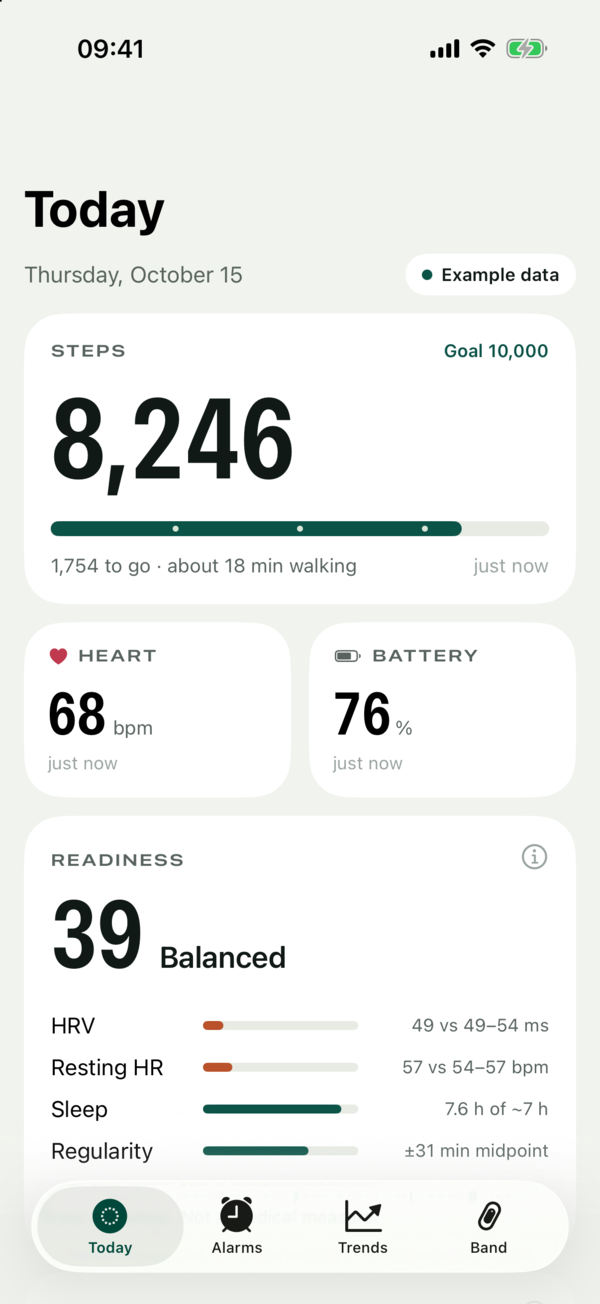
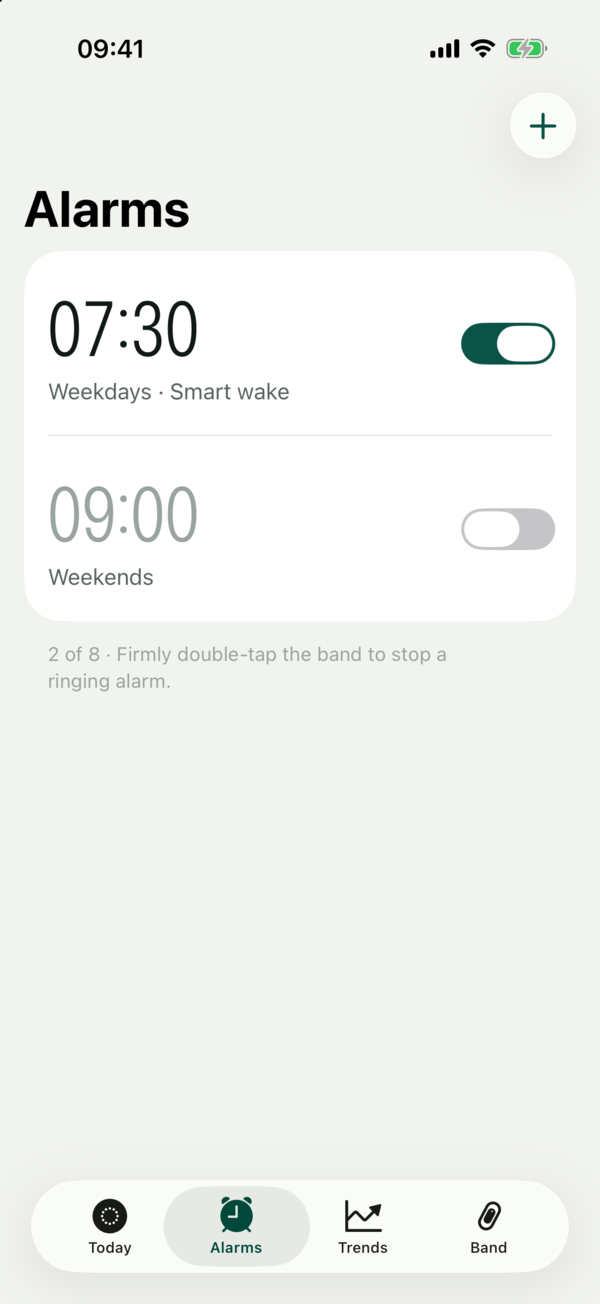
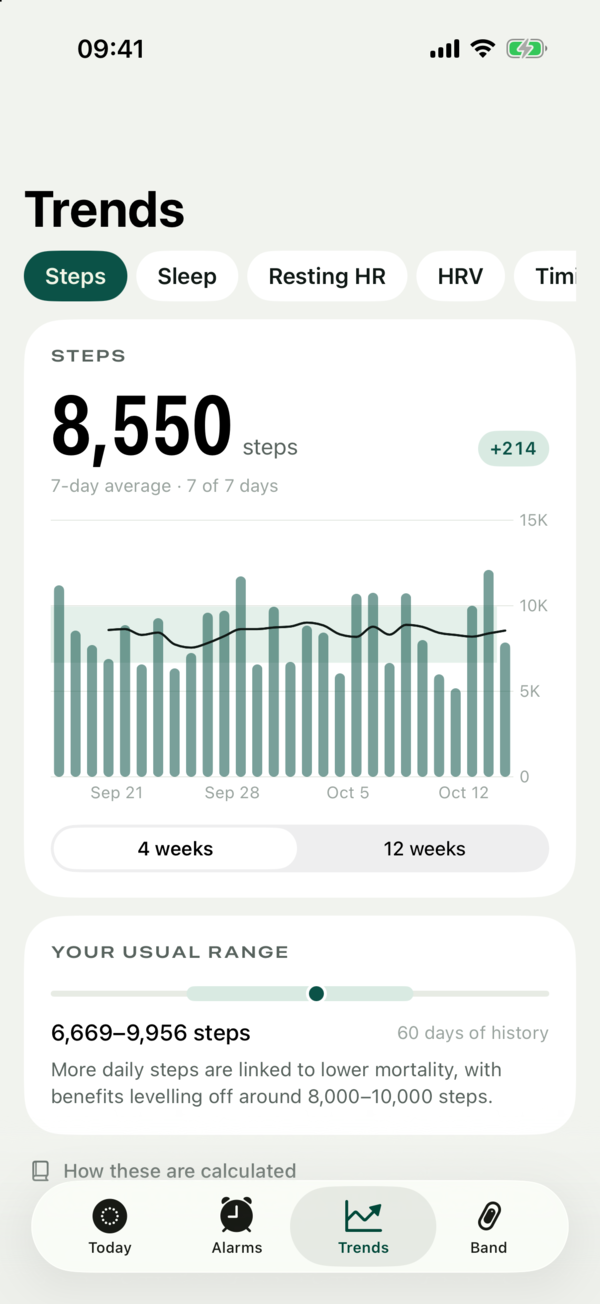
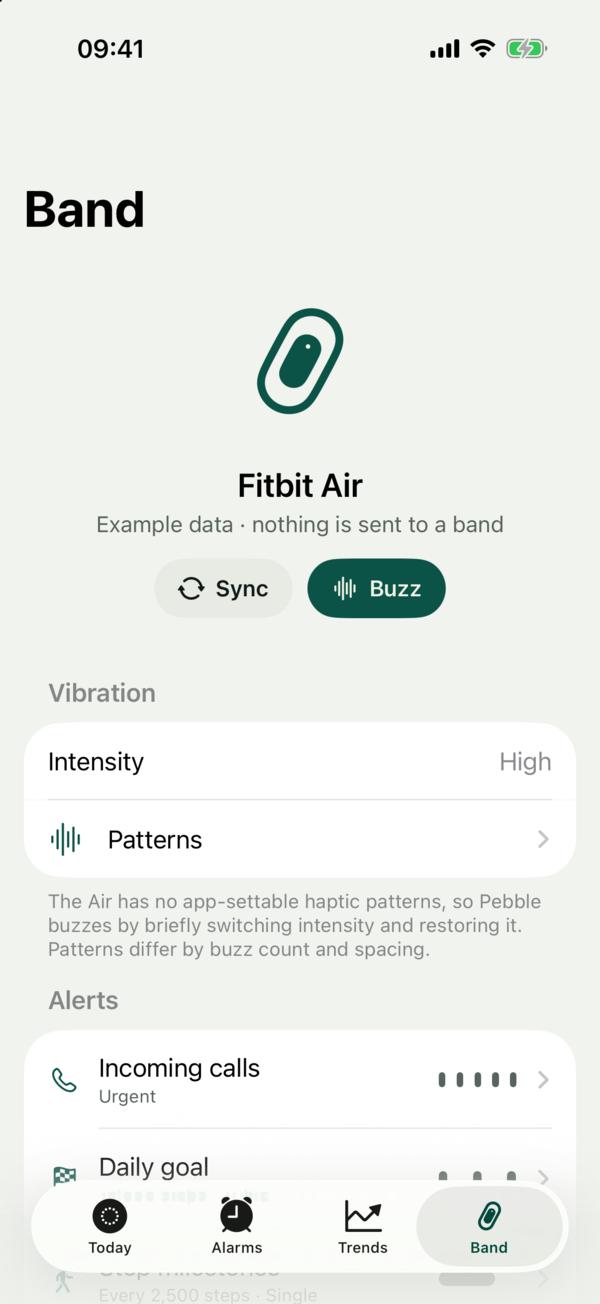
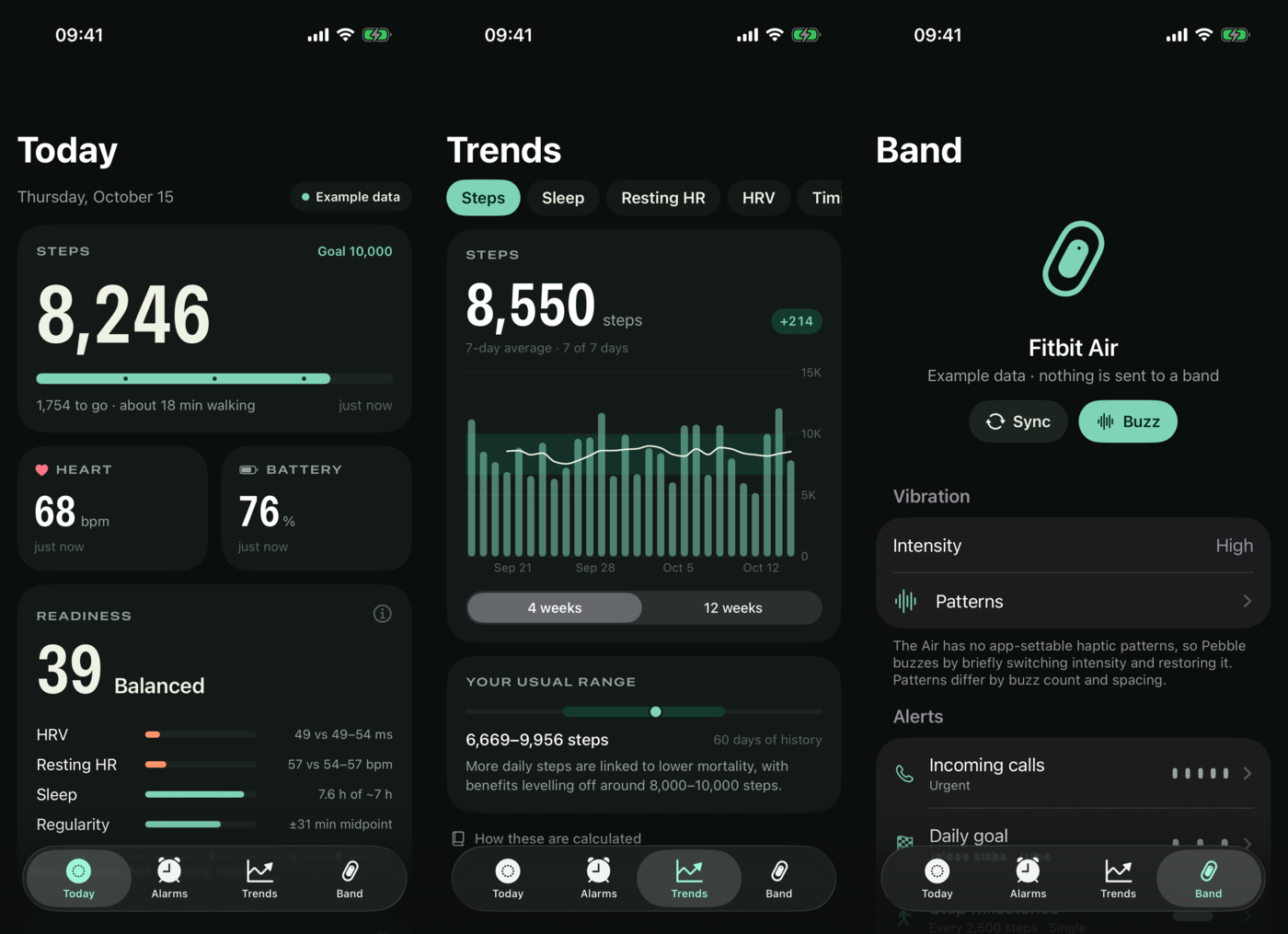
Four tabs: Today, Alarms, Trends and Band. Every figure says where it came from and when, and every method is explained in the app with its citation.
Today and Alarms
Pull to sync. Steps, heart rate and battery come straight from the band; Readiness combines your own HRV, resting heart rate, sleep and regularity and shows each part.
- Add, edit, repeat and delete alarms — with smart wake, verified by reading back
- Readiness 0–100 — HRV 40, resting HR 25, sleep 25, regularity 10
- Shortcuts & Siri — Buzz Band, Get Steps, Get Band Battery
Trends and Band
Trends compares your last week with your own previous 60 days, never with a population average. Band is where alerts live: each event gets its own pattern, plus an optional iPhone notification or webhook.
- Incoming calls — via CXCallObserver, Urgent pattern by default
- Daily goal, step milestones, move reminder — journaled first, never replayed
- Keep Pebble running — opt-in silent audio session for alerts while locked
- Webhooks —
{"event":"goal","steps":10240,…}for Home Assistant or n8n
Every number has a citation.
Missing days are never zero, Apple Health sources are never blended, and nothing is a diagnosis. Full detail in METHODS.md.
Usual range
last 7 d vs previous 60 d
HRV log-scaled ±0.5 SD (Plews 2013); resting HR and sleep ±1 SD.
Training load
RPE × minutes
Session RPE (Foster 2001); fitness and fatigue as 42- and 7-day weighted loads (Banister 1975).
Workload ratio
EWMA acute : chronic
Williams 2017, shown with the 0.8–1.3 band as context, not a rule.
Cardio fitness
VO₂max ≈ 15.3 × HRmax / HRrest
Uth 2004; HRmax = 208 − 0.7 × age (Tanaka 2001); ranked by Cooper Institute norms.
Sleep timing
midpoint · 14-night SD
Regularity of the main episode; social jetlag as weekend vs weekday gap (Wittmann 2006).
Steps
~100 steps/min
Moderate walking cadence (Tudor-Locke 2018); goal guidance from Paluch 2022.
Every write is a round trip.
The C bridge exposes the routes above and nothing else: no firmware, reset, pairing, sync-acknowledgement or arbitrary-command paths.
Read fresh
Current alarms or settings are read in the same session, never from a cache.
Back up
The prior state is journaled in protected storage, so an interrupted change recovers on the next connection.
Write once
One request, no automatic retry. Only the known submessage is sent; unknown fields are kept.
Read back
The result is compared field by field. A conflicting change is reported, never overwritten.
A firmware quirk, handled on purpose. Creating an alarm returns CoAP 5.00 and enables it even when it was sent disabled. Pebble never repeats the POST: it reads back, finds exactly one new alarm, checks every other alarm is unchanged and applies one corrective PUT.
From an encrypted trace to a buzz.
Evidence was graded at every step: live-verified, primary reference, recovered static output or unverified. Nothing was enabled on a guess.
First Bluetooth trace
A 90 s PacketLogger capture while the official app opened alarms: 185 IPv4/UDP datagrams reassembled from Gattlink, every one a DTLS 1.2 application record on port 5684.
Schema from static analysis
Alarm, settings and capability messages recovered from the Android app's code. The key surprise:
PUT /settingsis a query,POSTis the write.Keys, read once
After fixing two gRPC handling defects in mitmproxy, a scoped, single-use probe read the paired Air's two keys: four GETs in total, no writes. Proxy, certificates and trust were removed afterwards.
Handshake decrypted offline
A fresh trace caught the full handshake. Rebuilding the transcript verified both Finished messages; all 131 records parsed as CoAP. The alarm list decoded: capacity 8, smart wake supported.
First custom connection
Golden Gate and Mbed TLS embedded in a C bridge. Connected, authenticated and read two alarms in six seconds. Google Health kept syncing.
Writes on the real band
Alarm create, edit and delete with exact restoration; vibration by intensity toggle; a reordering bug in Gattlink sends fixed with a bounded FIFO.
Pebble 1.1
Countable vibration patterns, a backgrounded CallKit call buzzing the band end to end, and cited health models.
Bring your own band.
macOS, Xcode with an iOS 18+ SDK, CMake 3.25+. Dependencies are fetched at pinned, hash-checked versions. The offline checks need no phone, band or key.
# fetch Golden Gate + Mbed TLS, then build for the simulator
$ ./scripts/prepare-native.sh
$ ./scripts/build-simulator.sh
$ xcrun simctl launch booted com.medpar.air.companion --preview

# encrypted synthetic-peer transport, parsers, fitness and storage tests
$ ./scripts/check-offline.sh

# your own phone (free Personal Team signing lasts 7 days)
$ AIR_DEVELOPMENT_TEAM=YOUR_TEAM_ID ./scripts/build-ios.sh